
Minecraft FPS boost guide: optimize Java & Bedrock for smooth frametimes
Direct Answer: For Minecraft Java, allocate 4GB-6GB of RAM, install Sodium (or Fabric optimization mods), and set simulation distance to 8 chunks. In Bedrock, lower render distance to 12-16 chunks and disable fancy leaves. Use SysCubes to monitor frametimes and manage audio without Alt-Tab.
Option 1: Sodium & Modern Optimization Mods (Java)
Modern Minecraft Java relies on community-developed rendering engine replacements like Sodium and Lithium, which rebuild Minecraft's chunk rendering pipeline from the ground up.
Massive FPS gains Delivers 2x to 4x higher framerates and drastically faster chunk loading than the vanilla client or legacy OptiFine.
- Install the Fabric Loader for your target Minecraft version.
- Place Sodium (rendering engine), Lithium (physics optimization), and FerriteCore into your
.minecraft/modsfolder. - If you want shaders, add Iris for full shader pack compatibility with near-zero overhead.
Option 2: JVM Arguments & RAM Allocation (Java)
Allocating too little RAM causes frequent Java garbage collection freeze spikes, while allocating too much RAM (over 8GB on unmodded clients) causes long lag pauses.
Optimal sweet spot Assigning 4GB to 6GB is ideal for vanilla and light modpacks, ensuring smooth garbage collection without micro-stutters.
- Open the Minecraft Launcher, click Installations, select your profile, and click More Options.
- In the JVM Arguments field, change
-Xmx2Gto-Xmx4G(or-Xmx6Gfor heavy modpacks). - Save the profile and launch the game to confirm memory allocation on the F3 screen.
Option 3: Core Video Settings (Java & Bedrock)
Chunk simulation distance and graphical embellishments heavily tax single-thread CPU performance in both Java and Windows Bedrock editions.
Distance vs smoothness Setting render distance to 12-16 chunks and simulation distance to 8 keeps tick rates stable without dropping FPS.
- In Video Settings, set Simulation Distance to 6 to 8 chunks to reduce entity and tick processing.
- Set Graphics to Fast or disable Fancy Leaves and Clouds.
- Turn Biome Blend to 5x5 or off to reduce terrain transition calculation lag.
Option 4: SysCubes Minecraft HUD & Audio Control Recommended HUD

SysCubes runs as a lightweight in-game overlay for Minecraft, displaying live FPS, 1% low frametimes, and hardware temperatures, while letting you adjust Discord and music volume without leaving the game.
No Alt-Tab audio control Change Spotify and Discord volume on the fly without minimizing Minecraft or risking borderless window crashes.
- Download SysCubes free for Windows via Overwolf.
- Press Alt + O while playing Minecraft to toggle the Performance Monitor HUD.
- Press Alt + V to instantly balance your friends' voice volume in Discord against game footsteps and background tracks.
Monitor frame consistency and audio
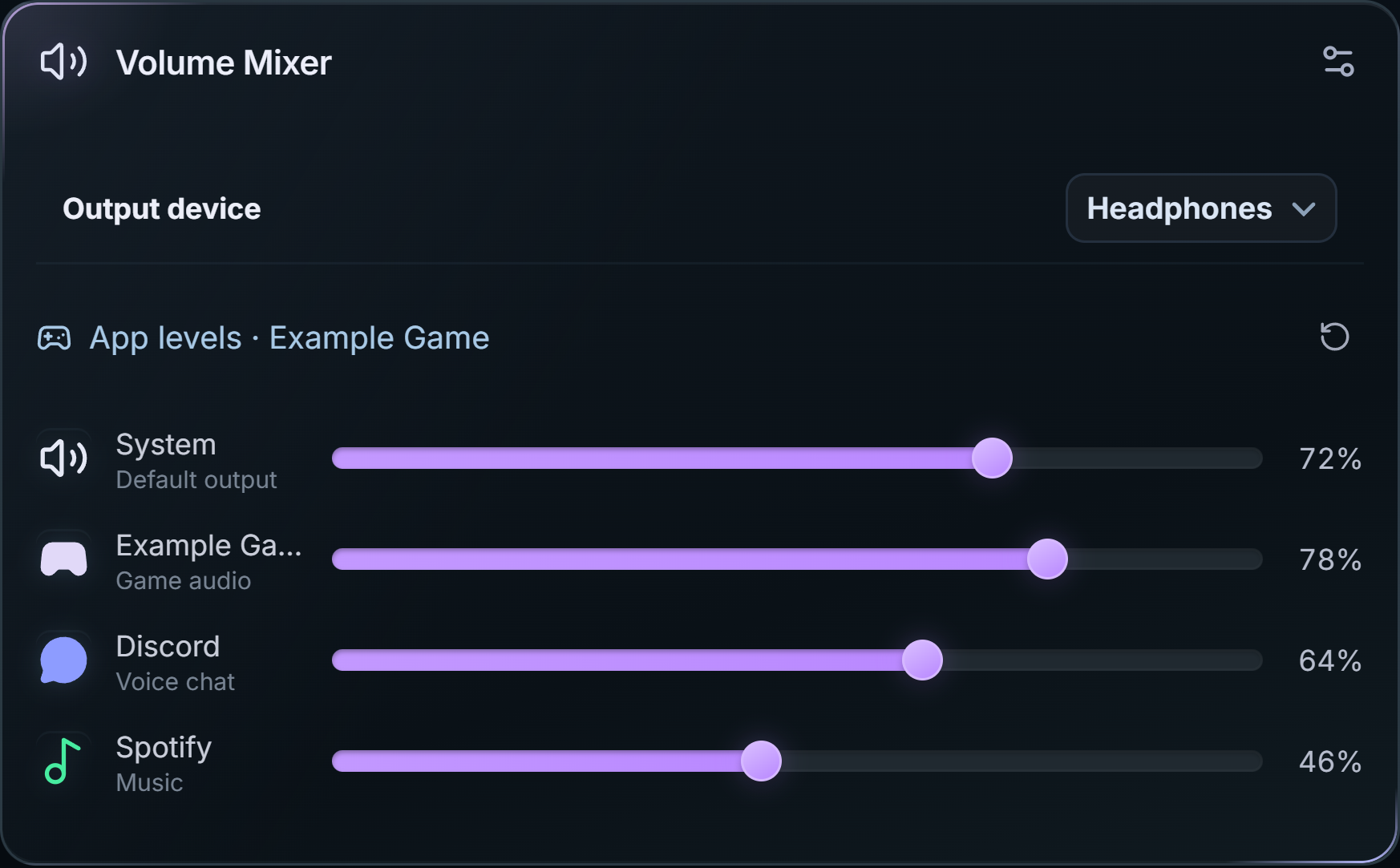
Track 1% low frame dips and adjust Discord audio without pausing full-screen Minecraft.
Troubleshooting Minecraft performance issues
Why does Minecraft drop FPS when loading chunks?
Chunk loading requires intensive CPU thread calculation to generate blocks, light levels, and entity data. Modern mods like Sodium and Lithium multithread chunk building to prevent stuttering.
Is OptiFine or Sodium better for Minecraft FPS?
Sodium is significantly faster than OptiFine on modern Minecraft versions (1.16+), delivering up to 3x higher FPS and smoother 1% low frametimes. Use Sodium with Iris for shader pack support.
Why does Minecraft stutter every few seconds?
Regular stuttering is usually caused by Java Garbage Collection cycles resetting when RAM fills up. Allocate 4GB to 6GB of RAM and use optimized JVM garbage collection flags.
Frequently asked questions about Minecraft performance
How much RAM should I allocate to Minecraft?
For vanilla Minecraft, 4GB of RAM is optimal. For modded instances with 100+ mods or heavy shaders, allocate 6GB to 8GB. Allocating more than 8GB to standard vanilla can cause stutter due to Java garbage collection pauses.
How do I show FPS in Minecraft without the cluttered F3 screen?
Instead of opening the complex F3 debug screen which covers your whole view, use SysCubes Performance Monitor overlay (Alt + O) to see a clean, compact FPS, frametime, and temperature counter.
Can I control Discord volume while playing Minecraft without Alt-Tab?
Yes. SysCubes provides an In-Game Volume Mixer accessible via Alt + V that allows you to turn down Discord teammates or adjust Spotify music without minimizing your game.
Does Minecraft Bedrock run faster than Java Edition?
Minecraft Bedrock Edition is coded in C++ rather than Java, allowing it to achieve higher render distances and higher raw framerates out of the box, although modded Java with Sodium achieves comparable smoothness.
Related guides and tools
Sources and technical documentation
Official documentation on Minecraft Java performance and rendering optimization.